Delete your Rewoa account
We're sorry to see you go. Before you proceed, please understand that deleting your account is permanent and cannot be undone.
What gets deleted instantly?
• Your profile and personal information
• Your portfolio data
• Saved preferences and documents
What is NOT automatically deleted?
If you have any of these records:
• Any pending investments or withdrawals (must be settled first)
• Investment history and portfolio data (Required by authorities)
• Transaction records (We need to keep these for legal compliance per UAE regulations)
Steps to Delete Your Account from the Rewoa Mobile Apps: (iOS & Android)
Step 1
Open the Rewoa app on your mobile device and log into your account.
Step 2
Tap the Account button in the bottom navigation bar. (If you are in Help Screen you will also see the “Delete Account” button at the bottom.
Step 3
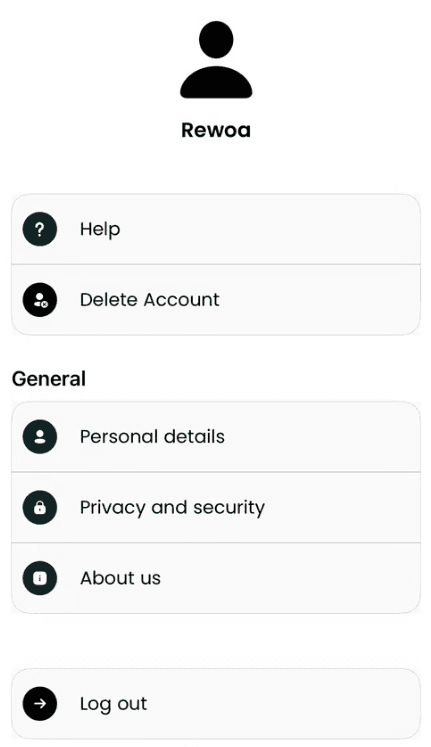
You will be taken to the Account screen. Tap the Delete Account option (the second option on the screen).
Step 4
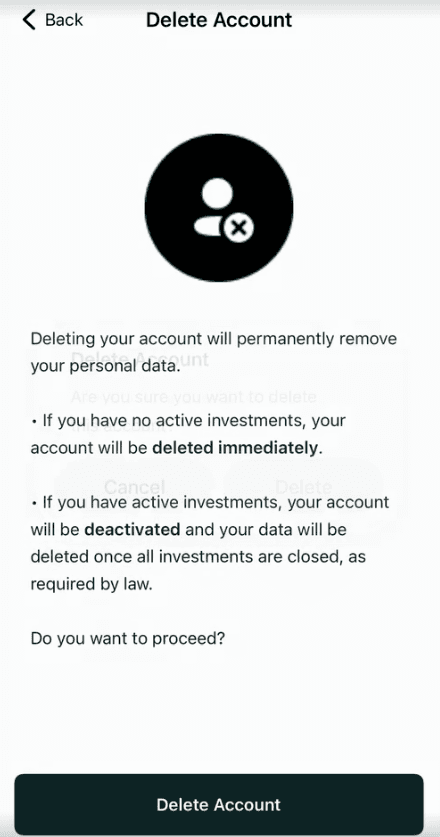
You will be taken to Delete Account screen:On the Delete Account screen, read all the information carefully. Then tap the Delete Account button at the bottom.
Step 5
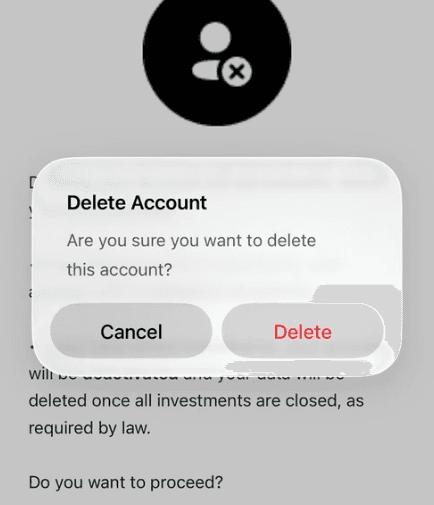
A prompt will appear to confirm the deletion. Tap the Delete button to proceed.
(If you are not logged in or your session expired, You will then be asked to confirm your password or verify your identity via an OTP sent to your registered email or phone.)
Step 6
When your delete request is submitted successfully, you will see a confirmation screen.
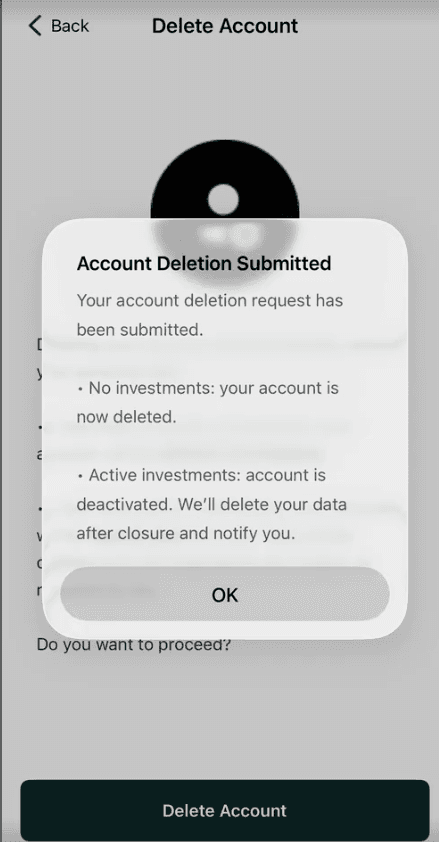
Note: If you have not yet invested in any property and have not added any funds, your account and personal information will be deleted immediately.
Can't access the app?
If you cannot log into the app (forgotten password, lost access), please email our support team from your registered email address with the subject line: "Account Deletion Request".
Contact Support
Email: support@rewoa.com
Please include your full name and registered phone number
Processing time
Requests submitted via email are processed within 5-7 business days.
© 2026 – REWOA
Delete your Rewoa account
We're sorry to see you go. Before you proceed, please understand that deleting your account is permanent and cannot be undone.
What gets deleted instantly?
• Your profile and personal information
• Your portfolio data
• Saved preferences and documents
What is NOT automatically deleted?
If you have any of these records:
• Any pending investments or withdrawals (must be settled first)
• Investment history and portfolio data (Required by authorities)
• Transaction records (We need to keep these for legal compliance per UAE regulations)
Steps to Delete Your Account from the Rewoa Mobile Apps: (iOS & Android)
Step 1
Open the Rewoa app on your mobile device and log into your account.
Step 2
Tap the Account button in the bottom navigation bar. (If you are in Help Screen you will also see the “Delete Account” button at the bottom.
Step 3
You will be taken to the Account screen. Tap the Delete Account option (the second option on the screen).
Step 4
You will be taken to Delete Account screen:On the Delete Account screen, read all the information carefully. Then tap the Delete Account button at the bottom.
Step 5
A prompt will appear to confirm the deletion. Tap the Delete button to proceed.
(If you are not logged in or your session expired, You will then be asked to confirm your password or verify your identity via an OTP sent to your registered email or phone.)
Step 6
When your delete request is submitted successfully, you will see a confirmation screen.
Note: If you have not yet invested in any property and have not added any funds, your account and personal information will be deleted immediately.
Can't access the app?
If you cannot log into the app (forgotten password, lost access), please email our support team from your registered email address with the subject line: "Account Deletion Request".
Contact Support
Email: support@rewoa.com
Please include your full name and registered phone number.
Processing time
Requests submitted via email are processed within 5-7 business days.
© 2026 – REWOA
Delete your Rewoa account
We're sorry to see you go. Before you proceed, please understand that deleting your account is permanent and cannot be undone.
What gets deleted instantly?
• Your profile and personal information
• Your portfolio data
• Saved preferences and documents
What is NOT automatically deleted?
If you have any of these records:
• Any pending investments or withdrawals (must be settled first)
• Investment history and portfolio data (Required by authorities)
• Transaction records (We need to keep these for legal compliance per UAE regulations))
Steps to Delete Your Account from the Rewoa Mobile Apps: (iOS & Android)
Step 1
Open the Rewoa app on your mobile device and log into your account.
Step 2
Tap the Account button in the bottom navigation bar. (If you are in Help Screen you will also see the “Delete Account” button at the bottom.
Step 3
You will be taken to the Account screen. Tap the Delete Account option (the second option on the screen).
Step 4
You will be taken to Delete Account screen:On the Delete Account screen, read all the information carefully. Then tap the Delete Account button at the bottom.
Step 5
A prompt will appear to confirm the deletion. Tap the Delete button to proceed.
(If you are not logged in or your session expired, You will then be asked to confirm your password or verify your identity via an OTP sent to your registered email or phone.)
Step 6
When your delete request is submitted successfully, you will see a confirmation screen.
Note: If you have not yet invested in any property and have not added any funds, your account and personal information will be deleted immediately.
Can't access the app?
If you cannot log into the app (forgotten password, lost access), please email our support team from your registered email address with the subject line: "Account Deletion Request".
Contact Support
Email: support@rewoa.com
Please include your full name and registered phone number.
Processing time
Requests submitted via email are processed within 5-7 business days.
© 2026 – REWOA